ETport Firmware Recovery Procedure
NOTE: This procedure ONLY works on the external ETport models.
DO NOT use this on the WattsOn-Mark II "-E4"devices.
For the WattsOn-Mark II -E4, please follow this link:
https://support.elkor.net/knowledgebase.php?article=34
ETport can be updated with new firmware using the web interface.
In some cases, if this is not possible, or if the firmware is corrupt, there is an alternative method.
METHOD 1) Automated Batch File
- Connect an ethernet cable directly from the ETport meter to the laptop/PC
- Download the ZIP file below:
https://elkor.net/bin/firmware/ETport_Firmware_Recovery.zip - Extract the ZIP file to it's own directory
- Navigate to the directory
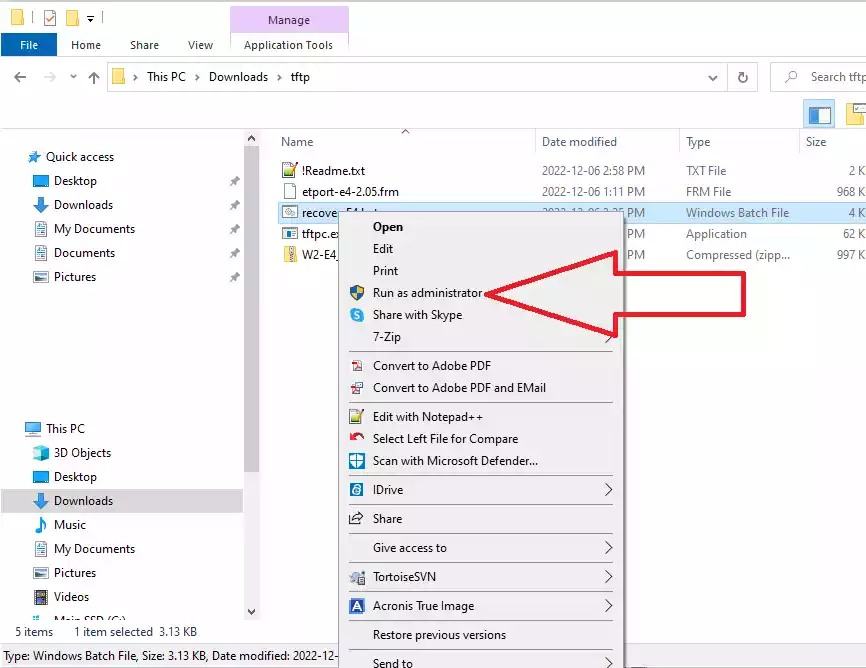
- Using Windows Explorer, RIGHT-CLICK on the "recover_ETport.bat", and select "Run as Administrator"
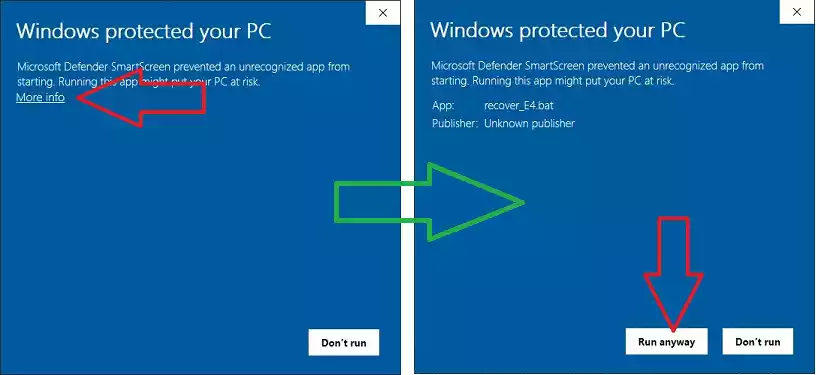
- If Windows warns you of running the program, please click "More Info" and "Run Anyway"
- The batch file will list available network interfaces.
You must select the one which corresponds to the direct ethernet connection to the meter.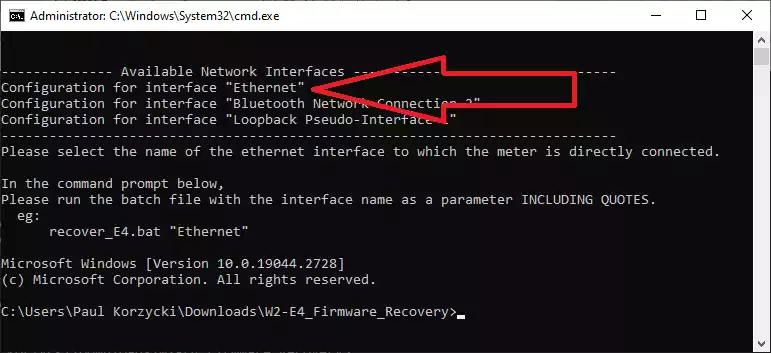
- Run recover_ETport.bat "<name of interface>". ie:
recover_ETport.bat "Ethernet" - Follow the prompts.